Upload music
Send an audio file or an audio document to the bot in your private chat with it, or forward one from another chat. The bot tags the file, puts it in your library, and Navidrome picks it up. You don’t need SSH or a file manager on the server.
The bot accepts MP3, FLAC, M4A, OGG, Opus, and WAV. It converts WAV to FLAC, which loses no audio quality.
| Reaction | Meaning |
|---|---|
| 👀 | The bot took the file and is working on it |
| 👍 | The track is in your library |
| 👎 | Something went wrong; the bot explains in a message |
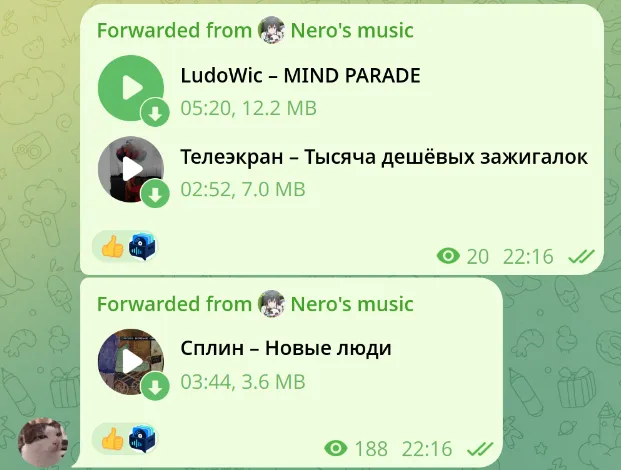
New tracks go to your personal library and show up in Navidrome after it scans them. Uploading doesn’t put the track in the shared library or send it anywhere else.
Track details and artwork
Section titled “Track details and artwork”The bot fills in the artist, title, album, album artist, year, and track number, then writes these tags into the file. Navidrome and your player then show the same details as the bot.
For each field it takes the first of these sources that has a value:
- Details from the streaming service, for imported tracks.
- Tags already in the file.
- Artist and title that Telegram shows for the audio.
- A file name in the form
Artist - Title.
So an MP3 with no tags still gets an artist and title from Telegram or its file name, while tags in the file win over Telegram’s labels. The bot trims stray whitespace and uses the track artist as album artist when the file has none.
Zvuk imports also bring the album, year, track number, and cover. The bot embeds the cover in the downloaded file.
New music is filed into artist and album folders; singles get a folder of their own. You can’t edit tags by hand in the bot yet. Files in existing libraries keep their tags untouched.
Duplicates
Section titled “Duplicates”The bot compares tags and duration to find matching tracks. In your personal library, a better copy replaces a worse one: lossless beats lossy, and between two lossy copies the higher bitrate wins.
If the match is in an existing library you can access, the bot skips the new copy whatever its quality, and leaves the existing file alone.
Missing artist or title
Section titled “Missing artist or title”A file without an artist or title goes to Inbox. You can keep and play it, but you can’t share it until it has both. Tag such files before uploading when you can.
If the server’s administrator retags a file on disk, the bot picks up the change on its next pass over the library, hourly by default.
When an upload fails
Section titled “When an upload fails”Read the bot’s message next to 👎 first. The usual causes are a full quota, an unsupported or damaged file, or Telegram’s size limit. If Telegram failed to deliver the file, send it again. For quotas or errors that keep coming back, ask the administrator.
See also libraries and quotas and troubleshooting.